Skip to product information
1 of 5

FrSky

FrSky Archer Plus SR8 8-Channel Stabilized Receiver

FrSky Archer Plus SR8 8-Channel Stabilized Receiver

Regular price $49.99 USD
Regular price Sale price $49.99 USD
Sale Sold out
Quantity
View full details

FrSky Archer Plus SR8 ACCESS / ACCST D16 Stabilized Receiver

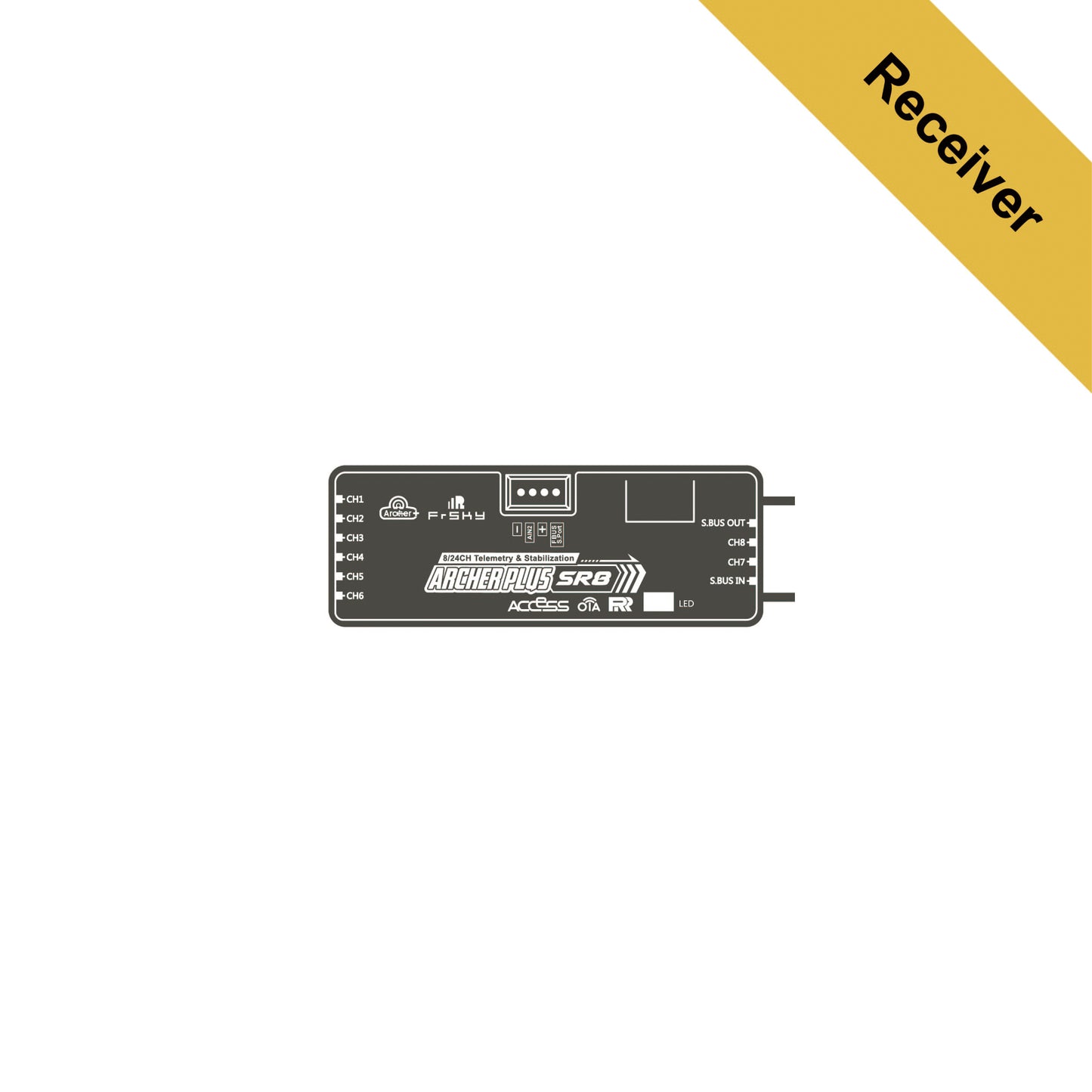
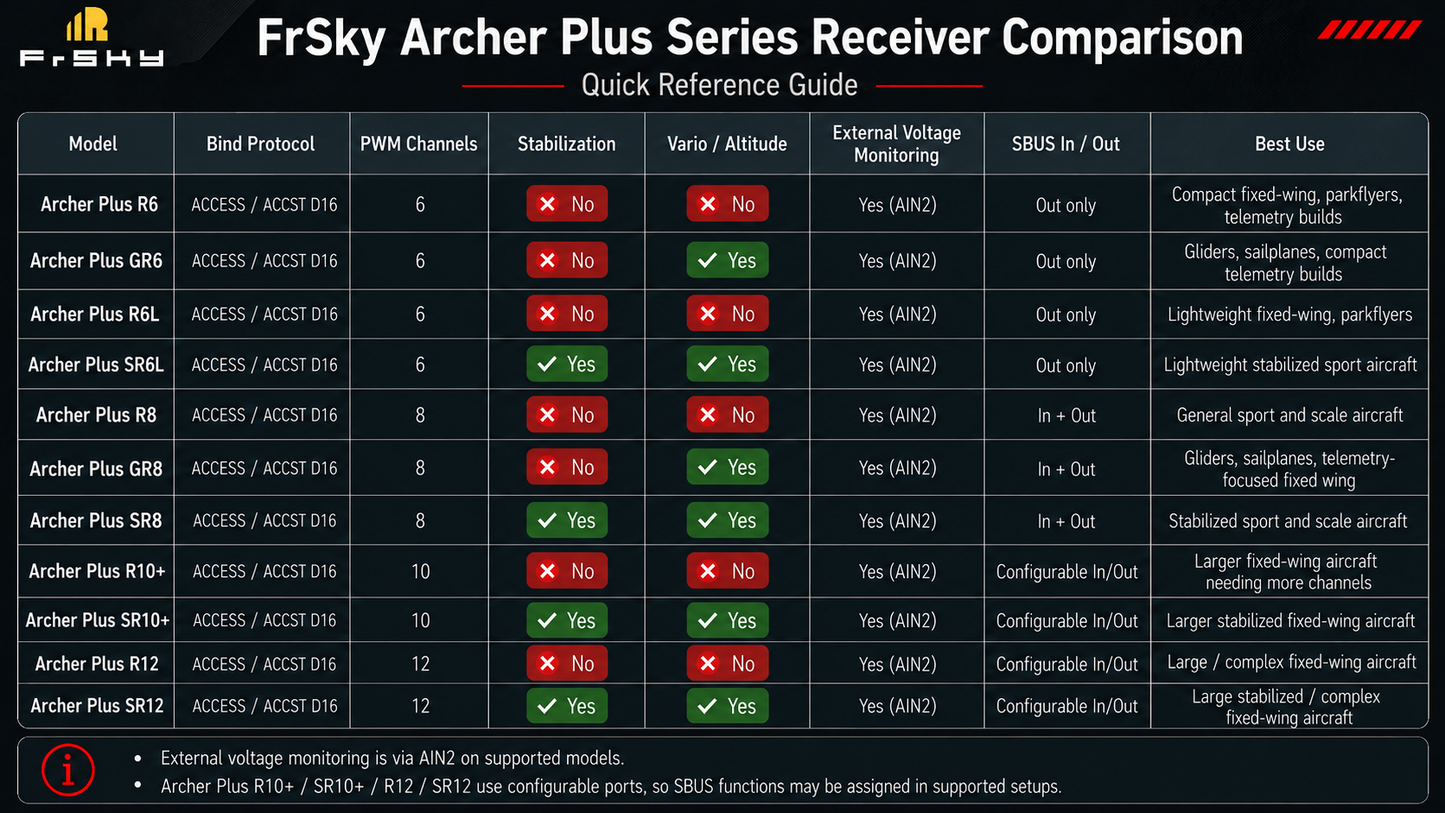
The FrSky Archer Plus SR8 is a full-range 8-channel receiver with built-in stabilization, telemetry, signal-redundancy support, and flexible aircraft integration. Designed for sport aircraft, scale models, aerobatic airplanes, electric aircraft, and other fixed-wing builds, the SR8 combines eight high-precision PWM outputs with an integrated 3-axis gyroscope and 3-axis accelerometer, reducing the need for a separate stabilization system.

The Archer Plus SR8 supports both ACCESS and ACCST D16 protocols, providing broad compatibility across FrSky 2.4GHz radio systems. The Archer Plus Series features enhanced anti-RF interference performance and smart protocol matching during binding, helping provide a stable and dependable control connection. A built-in Black Box function can also preserve basic receiver power and signal-related flight data.

The integrated stabilization system supports multiple flight modes, including Auto-Level, Stabilization, Knife-Edge, and other configurable modes. Receiver orientation, aircraft type, channel assignments, gain settings, and flight modes can be configured using supported FrSky ETHOS tools or compatible Lua scripts.

The SR8 provides eight high-precision PWM outputs, SBUS Out with 16-channel or 24-channel support, and SBUS In for compatible receiver-redundancy installations. It can serve as the primary receiver in a redundant system by connecting its SBUS In port to a compatible secondary FrSky receiver equipped with SBUS Out.

The receiver supports full-range telemetry through S.Port or FBUS. When configured for FBUS operation, compatible FrSky telemetry sensors, XACT servos, ADV sensors, and other supported devices can share simplified control and telemetry wiring for a cleaner aircraft installation. The SR8 also supports external battery or device voltage monitoring through AIN2 and Over-The-Air firmware updates with compatible ACCESS systems.

Compatibility Note

The Archer Plus SR8 is compatible with and can bind to all FrSky ECOS, TWIN, and Tandem Series radios that support ACCESS or ACCST D16 protocols. This includes compatible transmitters and RF modules operating in either supported protocol mode.

Some advanced functions, including OTA firmware updates, stabilization configuration, FBUS device setup, telemetry settings, and Black Box data access, require a compatible ACCESS and ETHOS system.

The Archer Plus SR8 is not a TWIN TW receiver, Tandem TD receiver, ELRS receiver, Spektrum receiver, Futaba receiver, or FlySky receiver. Use this receiver only with compatible FrSky ACCESS or ACCST D16 radio systems.

Key Features

Full-range 8-channel stabilized FrSky receiver
Supports ACCESS and ACCST D16 protocols
Compatible with all FrSky ECOS, TWIN, and Tandem Series radios that support ACCESS or ACCST D16
Smart protocol matching during binding
Enhanced anti-RF interference performance
Built-in Black Box flight-data function
Built-in 3-axis gyroscope and 3-axis accelerometer
Supports Auto-Level, Stabilization, Knife-Edge, and other configurable flight modes
Configuration support through ETHOS and compatible Lua tools
8 high-precision PWM channel outputs
SBUS Out with 16-channel or 24-channel support
SBUS In for compatible receiver-redundancy setups
Can serve as the primary receiver in a redundant installation
Full-range S.Port and FBUS telemetry support
Up to 24 signal channels in supported configurations
Compatible with supported XACT servos, ADV sensors, and other FBUS devices
External battery or device voltage monitoring through AIN2
Over-The-Air OTA firmware update support
Dual detachable antennas with IPEX4 connectors
Suitable for sport aircraft, scale models, aerobatic aircraft, and larger fixed-wing builds

Brand: FrSky
• Model: Archer Plus SR8
• Receiver Series: Archer Plus Series
• Receiver Type: Stabilized fixed-wing receiver
• RF Protocol: ACCESS / ACCST D16
• Frequency: 2.4GHz
• PWM Channels: 8
• Maximum Signal Channels: 8 PWM with 16-channel or 24-channel SBUS modes
• Stabilization Sensors: 3-axis gyroscope and 3-axis accelerometer
• Supported Flight Modes: Auto-Level, Stabilization, Knife-Edge, and other configurable modes
• Operating Voltage: 3.5–10V
• Operating Current: Less than 65mA at 5V
• Operating Range: Greater than 2km under ideal conditions
• Telemetry: S.Port / FBUS
• Signal Outputs: PWM / SBUS Out / FBUS
• Redundancy Input: SBUS In
• Black Box Function: Supported
• External Voltage Detection: AIN2
• AIN2 Measurement Range: 0–35V
• Voltage Divider Ratio: 1:10
• Antennas: Dual detachable 2.4GHz antennas
• Antenna Connectors: IPEX4
• Firmware Updates: Over-The-Air OTA with compatible ACCESS systems
• Dimensions: 54 × 20 × 10mm
• Weight: 9.8g
• Compatibility: FrSky 2.4GHz ACCESS or ACCST D16 capable transmitters and RF modules

Actual operating range may vary depending on antenna installation, transmitter output, aircraft construction, terrain, local RF conditions, and environmental conditions.

Select the Correct RF Protocol

Create or open the aircraft model on your FrSky transmitter and select either ACCESS or ACCST D16 to match the receiver firmware and intended operating mode. ACCESS is recommended when supported because it enables additional receiver, telemetry, stabilization, and firmware-update features.

Binding

Place the transmitter into registration or binding mode for the selected protocol, then power the receiver and follow the current FrSky binding procedure for your transmitter and firmware version.

Receiver Orientation

Install the receiver securely in the aircraft and select the correct receiver orientation during stabilization setup. The receiver must remain firmly mounted and aligned with the aircraft. An incorrect orientation setting or loose installation can cause the stabilization system to command the control surfaces incorrectly.

Aircraft Type and Stabilization Configuration

Use the compatible FrSky ETHOS configuration tools or Lua script to select the aircraft type, receiver orientation, channel assignments, stabilization modes, and gain settings. Confirm that all stabilized surfaces are assigned correctly before flight.

PWM Connections

Connect standard servos, the ESC throttle lead, retracts, lights, flaps, landing gear, or other PWM-controlled accessories to the eight channel outputs. Verify signal, positive, and negative wire orientation before powering the receiver.

Stabilization Direction Check

Move the aircraft by hand and verify that every stabilized control surface moves against the unwanted aircraft movement. For example, when the aircraft rolls to the right, the ailerons should command a correction toward the left. Do not fly if any stabilization response is reversed.

Flight Modes

Assign the desired stabilization modes to transmitter switches. Available modes may include Stabilization, Auto-Level, Knife-Edge, and other supported modes depending on the aircraft type and receiver configuration. Confirm the active mode and control response before takeoff.

Gain Adjustment

Begin with conservative gain settings. Excessive gain can cause rapid control-surface oscillation in flight, while insufficient gain may provide little noticeable stabilization. Adjust the gain gradually and test changes at a safe altitude.

SBUS Out

Use SBUS Out when connecting the receiver to a compatible flight controller, channel expander, decoder, or other SBUS device. Configure the receiver for the required 16-channel or 24-channel SBUS mode.

SBUS In and Receiver Redundancy

The Archer Plus SR8 can serve as the primary receiver in a redundant setup. Connect the SBUS Out port of a compatible secondary FrSky receiver to the SR8’s SBUS In port. Confirm signal format, power distribution, and receiver compatibility before flight.

Telemetry and FBUS

The telemetry connection supports S.Port or FBUS operation with compatible FrSky devices. FBUS allows supported sensors, XACT servos, ADV sensors, and other compatible equipment to share simplified control and telemetry wiring.

External Voltage Monitoring

The AIN2 connection supports external battery or device voltage measurement from 0–35V when used with the correct 1:10 voltage divider. Do not connect a flight battery directly to AIN2 without the proper voltage divider or approved voltage-sensing cable.

Antenna Installation

Position the two antennas at different angles to improve signal diversity. Keep both active antenna elements away from carbon fiber, batteries, ESCs, motors, ignition systems, high-current wiring, and other conductive materials. Do not cut, pinch, sharply bend, or modify the antennas.

Firmware Compatibility

Before binding, confirm that the transmitter RF firmware and receiver firmware support the same ACCESS or ACCST D16 version. Firmware mismatches can prevent binding or cause receiver functions to operate incorrectly.

Preflight Check

Confirm correct channel movement, servo direction, stabilization direction, flight-mode operation, failsafe behavior, telemetry operation, and control response before flying. Complete a range check after installation and whenever the receiver, antenna placement, transmitter configuration, stabilization settings, or aircraft electronics are changed.